This open-source workflow automation tool has captured the attention of developers, technical teams, and forward-thinking organizations worldwide, boasting over 230,000 active users and ranking among the top 150 GitHub projects of all time. But what exactly is n8n, and why should you consider it for your automation needs?
What is n8n, and why is it worth learning?
n8n (pronounced “n-eight-n”) is an open-source workflow automation platform that allows users to connect various applications, services, and APIs to create sophisticated automated workflows. Unlike traditional automation tools that operate as black boxes, n8n provides complete transparency and control over your automation processes.
The platform operates under a fair-code license, meaning the core features remain source-available and free for individuals and certain usage scenarios, while premium enterprise features are available through paid plans. This approach has fostered a vibrant community that continuously contributes to the platform’s development, resulting in exponential growth with the community node ecosystem.
What makes n8n stand out is its powerful node-based architecture paired with the freedom to integrate custom logic. Each node represents a specific function—whether it’s an API call, data transformation, or workflow control—allowing users to visually design complex automation’s step by step. When visual tools aren’t enough, developers can seamlessly extend workflows by writing custom JavaScript or Python directly within the platform. This unique blend of no-code accessibility and full-code flexibility empowers both non-technical users and engineering teams to build, adapt, and scale automations without switching tools.
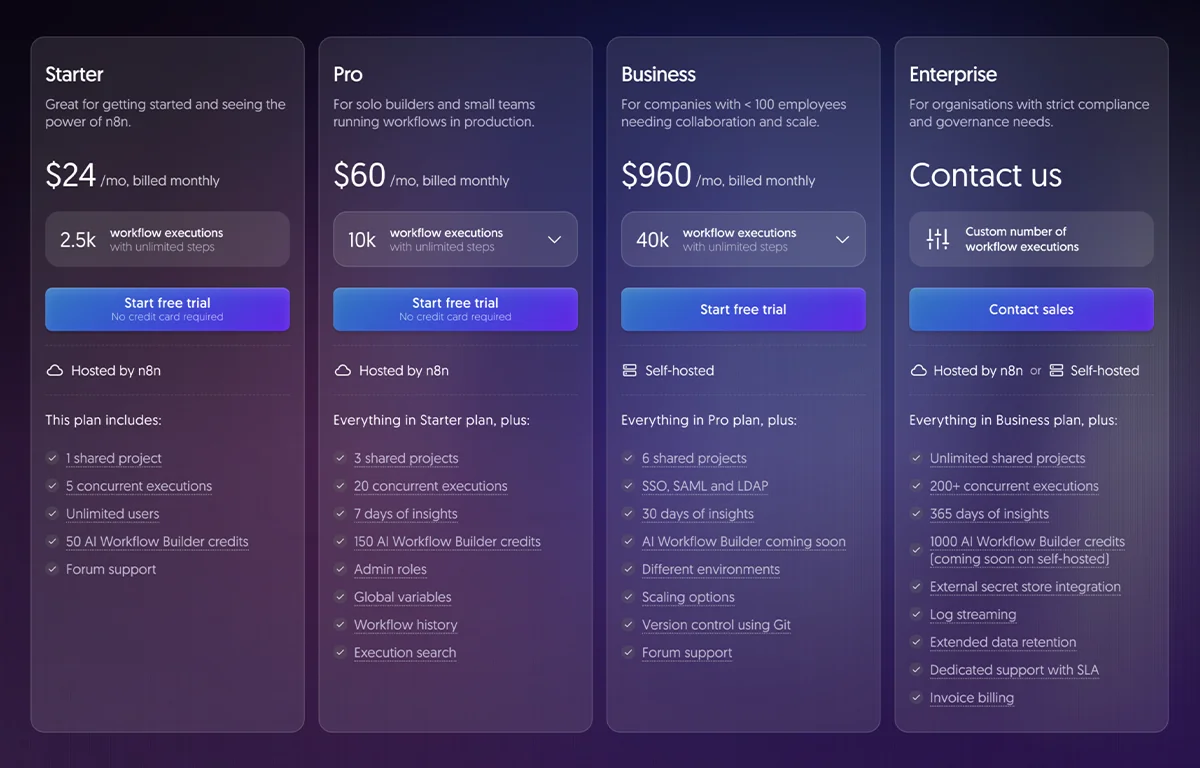
Pricing of n8n Cloud Version
Core Architecture and Components
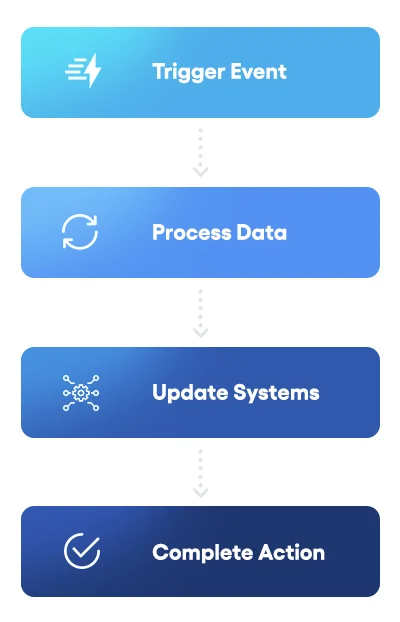 Understanding n8n’s architecture provides insight into its power and flexibility. The platform consists of several interconnected components working in harmony:
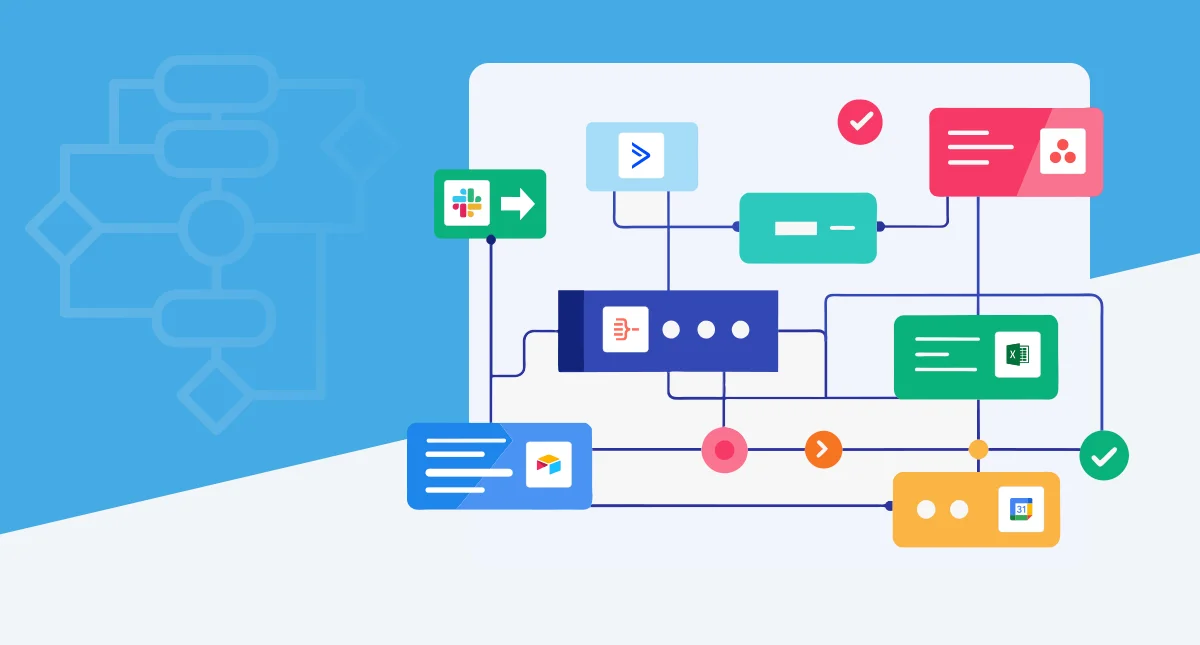
The visual workflow editor serves as the primary interface where users design automation workflows by dragging and dropping nodes onto a canvas. This intuitive visual representation resembles a flowchart, making complex logic easier to understand and manage. The editor converts your visual workflow into a JSON definition that gets stored in the database and executed by the backend engine.
At the core of n8n is its node-based system. Each node represents a single operation within a workflow, such as an API call, data transformation, or email action. There are two main types: Trigger nodes, which start workflows based on events like webhooks, schedules, or manual runs, and Regular nodes, which handle the actions themselves. With 400+ built-in nodes and a growing library of community extensions, n8n provides broad integration possibilities.
The workflow execution engine drives the automation process. It loads workflow definitions, executes tasks node by node, and passes data between them. The engine manages logging, error handling, and data transformations to ensure reliability even for complex workflows.
For data persistence, n8n uses SQLite by default for development, but recommends PostgreSQL or MySQL/MariaDB in production. The database stores workflow definitions, credentials, logs, and user data when authentication is enabled. (Multi-user management and team collaboration features are part of the paid plan.)
Finally, n8n offers a REST API for programmatic access—allowing you to create, trigger, or retrieve workflows and execution data. This makes n8n suitable both as a standalone automation tool and as an embedded component within larger systems. (The full API and advanced access controls are available in paid tiers.)
n8n Advanced Workflow Automation Logic
n8n supports advanced workflow logic, including conditional branching with IF and Switch nodes, loops for processing multiple items, parallel execution for improved performance, and sophisticated error handling mechanisms. These features enable the creation of workflows that can handle real-world complexity and edge cases.
Perhaps most exciting is n8n’s AI and LLM integration capabilities. The platform has positioned itself as “AI-native” with nearly 70 nodes dedicated to AI applications. n8n integrates seamlessly with OpenAI, Anthropic, and other AI providers, enabling users to build RAG (Retrieval-Augmented Generation) systems, autonomous AI agents capable of tool use and decision-making, and sentiment analysis and text classification workflows.
The platform’s AI Agents functionality represents a significant advancement, allowing users to create autonomous systems that perceive information, make intelligent decisions, and take actions to achieve specific goals. Unlike simple chatbots or linear workflows, AI agents in n8n can dynamically select tools, maintain conversation context, and adapt their behavior based on outcomes.
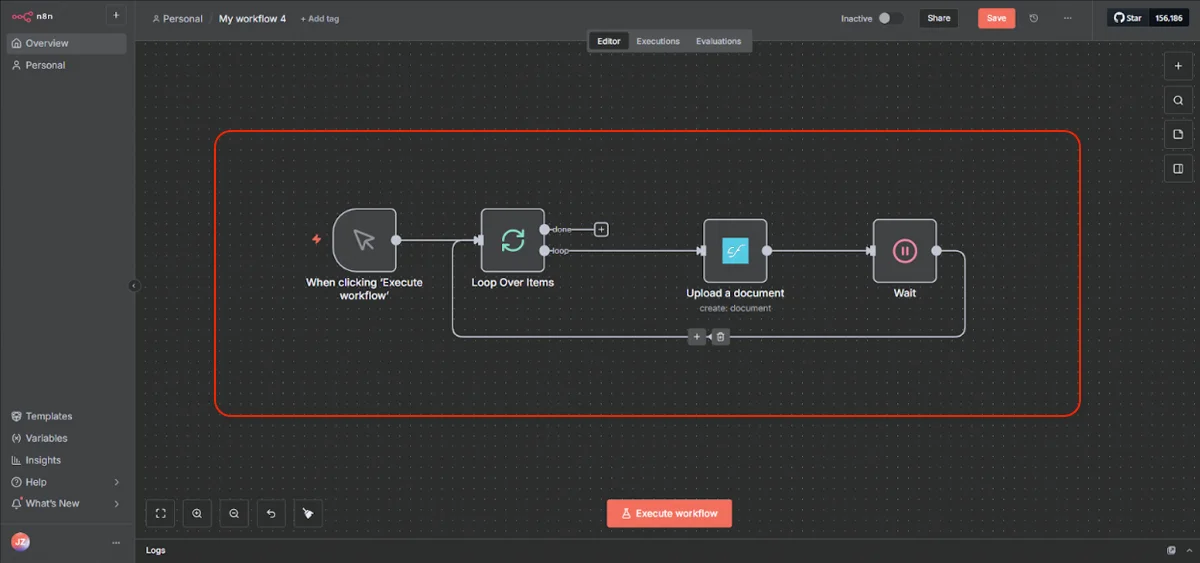
n8n Workflow Example
n8n vs. Competitors
When comparing n8n to established players like Zapier and Make, several distinctive differences emerge. While Zapier dominates with over 6,000 integrations and Make offers 1,500+, n8n’s 400+ integrations, coupled with unlimited custom API connections, provide sufficient coverage for most use cases.
The most significant differentiator lies in pricing philosophy. Traditional platforms charge per individual operation or task, meaning every action within a workflow consumes your quota. n8n’s execution-based pricing charges only for complete workflow runs, regardless of how many operations occur within that workflow. This model means a workflow with 100 operations counts the same as one with 10 operations—a single execution. For complex workflows, this can translate to cost savings of 90% or more compared to competitors.
Consider this example: running workflows with approximately 100,000 tasks could cost over $500 monthly on operation-based platforms. On n8n’s Pro plan, the same workload costs around $50, as charges only increase with execution count, not workflow complexity.
n8n’s open-source foundation provides advantages unavailable in proprietary tools. Users can inspect the source code, contribute improvements, create custom nodes without restrictions, and deploy on their own infrastructure with no vendor lock-in. This transparency and flexibility appeal particularly to technical teams who value control over their automation stack.
However, Zapier and Make offer advantages in certain areas. Zapier’s massive integration library and user-friendly interface make it ideal for non-technical users seeking a quick automation setup. Make provides a middle ground with more advanced features than Zapier while maintaining better accessibility than n8n.
n8n vs. Zapier vs. Make Comparison Chart
| Feature | n8n | Zapier | Make |
|---|---|---|---|
| Starting Price (Monthly) | Free (self-hosted) / $24/month (cloud) | $19.99/month (after free tier) | $10.59/month |
| Free Plan | Yes (self-hosted unlimited) | Yes (100 tasks/month) | Yes (1,000 operations/month) |
| Pricing Model | Execution-based | Task-based | Operation-based |
| Number of Integrations | 400+ native integrations (expandable via community and custom nodes) | 8000+ | 3000+ |
| Self-Hosting Option | Yes (Docker, VPS) | No | No |
| Custom Code Support | JavaScript, Python (full support) | Limited (Code by Zapier snippets) | JavaScript (Enterprise plan only) |
| Visual Workflow Builder | Node-based canvas | Linear trigger-action model | Visual drag-and-drop flowchart |
| Learning Curve | Steep (technical background helpful) | Easy (beginner-friendly) | Moderate |
| AI Integration | Advanced (LangChain, custom AI models) | Basic (ChatGPT, OpenAI integrations) | Good (OpenAI, Claude, Hugging Face) |
| Error Handling | Advanced custom error handling | Basic retries and notifications | Robust with alternative pathways |
| Execution Speed | Fast (self-hosted can be optimized) | Reliable, consistent (1-15 min) | Fast for complex workflows |
| Data Privacy Control | Full control (self-hosted) | Limited (cloud-only) | Limited (cloud-only) |
| Security & Compliance | DIY (depends on deployment) | SOC 2 Type II, GDPR, CCPA compliant | GDPR compliant, European data centers |
| Mobile App | No | No | Yes |
| Community & Support | Active community, forum support | Extensive docs, large user base | Good documentation, Make academy courses |
| Best For | Developers, technical teams, complex workflows | Non-technical users, simple automations | Visual thinkers, medium complexity workflows |
Who should use n8n?
n8n shines for specific user profiles and organizational contexts. Technical teams and developers find n8n ideal due to its code-friendly approach, extensibility through custom nodes, Git integration for version control, and API-first architecture. Development teams appreciate that n8n doesn’t force them into a no-code straightjacket but rather provides the flexibility to drop into code when needed.
- Cost-conscious businesses, particularly startups and SMB’s, benefit from n8n’s free Community Edition, execution-based pricing that scales affordably, and elimination of per-operation charges that can quickly escalate. For companies running complex workflows at volume, n8n can reduce automation costs by 80-90% compared to traditional platforms.
- Organizations prioritizing data privacy, such as those in healthcare, finance, or the government sectors, value n8n’s self-hosting capability that keeps sensitive data on-premise, compliance with strict data residency requirements, and complete transparency into data handling. When regulatory requirements prohibit sending data to third-party SaaS platforms, n8n provides a compliant alternative.
- Companies needing complex automation benefit from n8n’s advanced workflow logic, parallel execution capabilities, sophisticated error handling, and integration with custom APIs and internal systems. When business processes involve intricate conditional logic, data transformations, or integration with proprietary systems, n8n’s flexibility becomes essential.
Deployment Options
n8n offers flexible deployment options to match different organizational needs and technical capabilities. Self-hosted deployment remains the most popular approach, providing maximum control and cost efficiency.
Docker Containers
Common self-hosting methods include Docker containers, which offer the simplest deployment path with pre-configured images available. Many users deploy n8n on VPS providers like DigitalOcean, Hetzner, or Contabo, with costs starting as low as $5-10 monthly for small workloads. Platform-as-a-Service options like Railway provide one-click deployment templates that handle infrastructure complexity while remaining cost-effective. For production environments requiring high availability, n8n supports Kubernetes deployments with horizontal scaling.
Queue Mode Deployment
For improved performance and scalability, n8n offers queue mode deployment where you have multiple n8n instances set up, with one main instance receiving workflow information (such as triggers) and the worker instances performing the executions. This architecture leverages Redis for job queue management, enables horizontal scaling by adding worker instances, and provides better resource utilization and fault isolation. Queue mode is essential for enterprises running hundreds of workflows simultaneously.
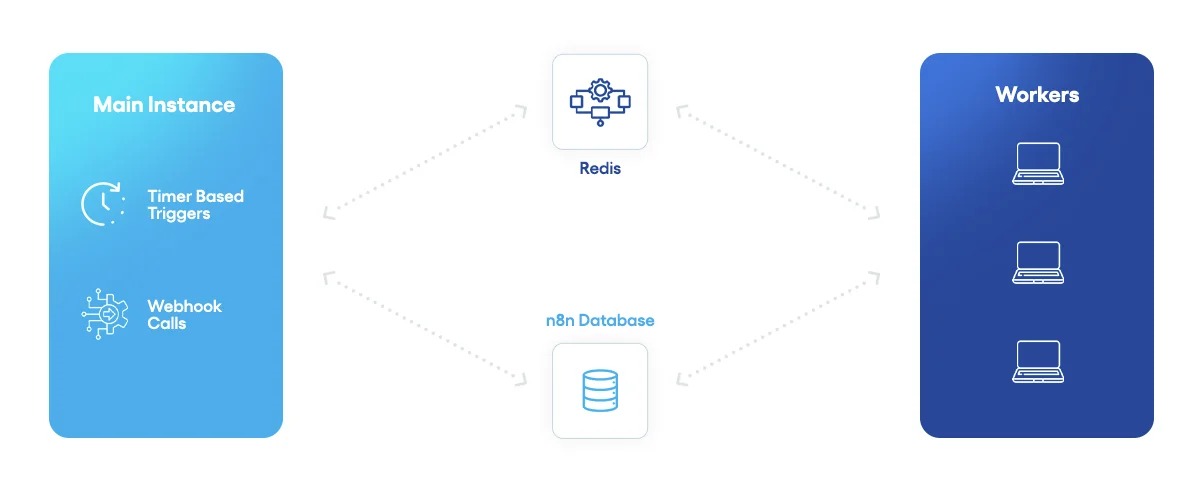
Queue mode architecture
Organizations preferring to avoid self-hosting complexity can use n8n Cloud, the official hosted service offering managed infrastructure, automatic updates, built-in redundancy and backups, and simplified setup without server management. Cloud plans start at $20 monthly for 2,500 workflow executions.
Integrations
n8n integrations are called nodes. There are three types of nodes:
- Built-in nodes
- Community nodes
- Custom nodes (write in a declarative or programmatic way)
Built-in Nodes
Built-in nodes form the core infrastructure of n8n and represent officially maintained integrations developed and supported by the n8n core team. These nodes encompass trigger nodes that initiate workflows based on events or schedules, regular nodes that perform tasks and interact with external services, logic nodes that control workflow branching through conditional statements, and specialized nodes for error handling and data transformation.
Built-in nodes cover hundreds of popular services, including Slack, Google Sheets, Salesforce, HTTP Request, and many others, providing pre-configured connections with proper authentication methods and comprehensive operation sets. The primary advantage of built-in nodes is their reliability, compatibility assurance across n8n versions, and extensive documentation—they’ve been battle-tested by thousands of users, which reduces debugging complexity and development time.
Community Nodes
If you can’t find a built-in node for your integration, you can search for a community node. Community nodes are user-developed integrations published to the npm registry and maintained by volunteers within the n8n ecosystem, available for installation through n8n’s GUI, npm CLI, or within Docker containers. These nodes expand n8n’s reach into specialized services and emerging platforms that haven’t yet received official support, allowing developers to share innovative solutions across teams and enterprises.
The advantages of community nodes include access to cutting-edge integrations, lower barriers to entry for independent developers seeking to contribute to the platform, and the ability to leverage specialized functionality created by domain experts. Community nodes also follow proper npm packaging standards, making them easy to distribute and version across organizations.
The trade-offs are that maintenance and support quality varies significantly—some community nodes are actively maintained while others become stale, potentially breaking with n8n updates. Additionally, there are security considerations since not all community nodes receive the same vetting as built-in nodes, though n8n does maintain a verification system to distinguish trusted contributors. Community node always has npm package name in convention: n8n-nodes- or for company-scoped package: @/n8n-nodes-.
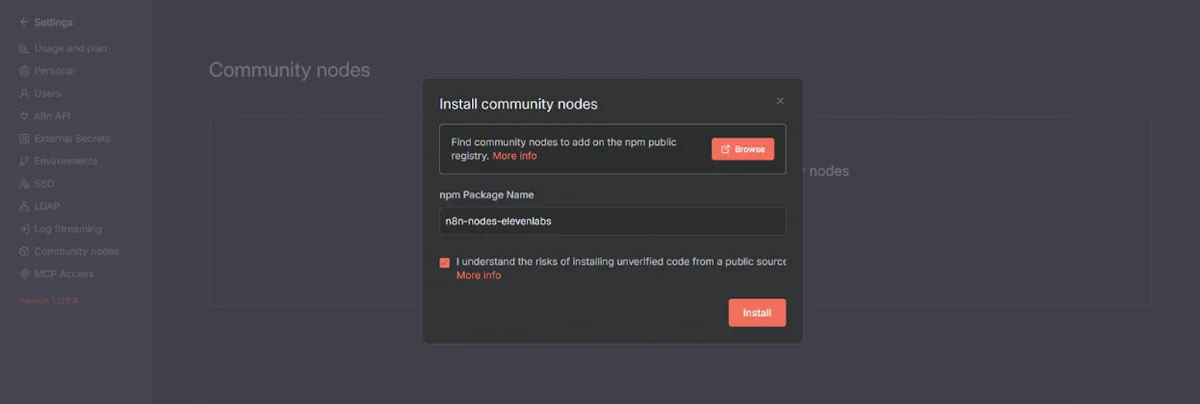
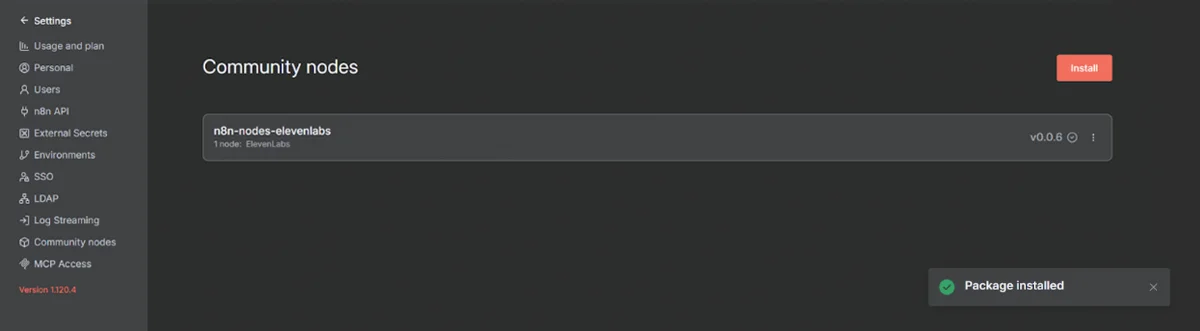
Installation process of the community node in the n8n UI
If there are no built-in or community nodes which are reaching the integration provider you need, you can always write your own node.
Custom Nodes
Custom nodes allow developers to build proprietary integrations using either declarative (JSON-based) or programmatic (TypeScript code-based) approaches, providing ultimate flexibility for unique business requirements. The declarative style uses JSON configuration to define node properties, inputs, outputs, and operations, making it simpler, less prone to bugs, and more maintainable for REST API-based integrations—this approach is recommended for most new nodes and significantly reduces boilerplate code.
The programmatic style provides complete control through TypeScript’s execute() method, offering maximum flexibility for complex logic, custom authentication patterns, and scenarios where declarative definitions fall short; however, it requires more development expertise and introduces higher maintenance overhead. Custom nodes encourage modular design patterns that improve code reusability, enable proper version control through Git, and can be published to npm for team-wide or public distribution.
The primary advantages are unlimited customization possibilities and the ability to encapsulate business-specific logic into reusable components that integrate seamlessly with workflows. The disadvantages include longer initial development time, TypeScript and n8n framework knowledge requirements, testing complexity, and ongoing maintenance responsibilities—complex custom nodes with many dependencies can become difficult to debug and maintain at scale.
Custom nodes are most valuable when you have proprietary integrations, require specialized data transformations not available in built-in nodes, or need to standardize repetitive integration patterns across multiple workflows. More about developing custom n8n nodes, you can read in our article – Introduction to Custom n8n Nodes Development.
Frequently Asked Questions
What is n8n?
n8n is an open source workflow automation platform that enables businesses and developers to visually connect apps, APIs, databases, and services to build automated processes. It offers flexibility to run workflows in the cloud, self host, or locally, while maintaining full control over data and execution logic.
How is n8n different from other automation tools like Zapier or Make?
Unlike SaaS-only automation platforms, n8n provides an open and extensible architecture. Users can create fully customized nodes, integrate proprietary systems, execute JavaScript inside workflows, and deploy automations on infrastructure they manage. This makes n8n better suited for organizations with security, data residency, or deep customization requirements.
Do I need to code to use n8n?
No. The core experience is built around a drag and drop, no code interface. However, n8n also supports custom code execution, API calls, conditional logic, and function nodes, meaning technical users can add code where precision automation demands it.
What are n8n nodes?
Nodes are modular automation building blocks that define actions within a workflow. Examples include sending emails, querying a database, calling an API, transforming data, triggering webhooks, or communicating with third-party applications. Each node performs a specific operation and passes output to the next step.
What type of systems can n8n connect to?
n8n integrates with a wide range of services including CRMs, payment gateways, ERPs, databases, analytics tools, communication platforms, AI models, cloud storage, internal APIs, HTTP endpoints, and custom business systems through community or user-built nodes.
Is n8n secure?
Security depends on the deployment approach. Because n8n can run on infrastructure fully controlled by the user, teams can enforce network isolation, encryption, identity access rules, VPN usage, internal firewalls, and compliance policies. No data needs to leave your environment if hosted privately.
Can n8n handle complex multi step workflows?
Yes. n8n supports sequences with branching logic, merges, loops, error handling, waits, conditional routing, dependency chaining, code injection, and parallel execution. This makes it highly capable for designing enterprise-grade automations rather than simple one-to-one triggers.
How can businesses use n8n for automation?
Common n8n use cases include:
- Syncing data between internal and external systems
- Automating lead routing and CRM updates
- Managing payment workflows and order fulfillment
- Executing AI operations (summarization, classification, generation)
- Alerting systems and operations triggers
- Automating support ticket creation and updates
- Internal process orchestration across tools and databases
Conclusion – n8n Automation Without Limits
n8n represents a paradigm shift in workflow automation, challenging the proprietary, pay-per-task model that has dominated the industry. Its open-source foundation, execution-based pricing, and developer-friendly approach have resonated strongly with technical teams, evidenced by explosive growth to over 230,000 active users and a 5x ARR increase in the past year.
The platform occupies a unique position in the automation landscape—more flexible and cost-effective than Zapier, more technically capable than Make, and truly customizable in ways proprietary platforms cannot match. For organizations willing to invest in technical setup and maintenance, n8n offers unparalleled value, control, and scalability.
Looking forward, n8n’s trajectory appears exceptionally promising. The platform’s AI-native approach positions it well for the coming wave of AI-driven automation, while the thriving community ensures continuous innovation and expansion. As more organizations recognize the limitations and costs of traditional automation platforms, n8n’s proposition of “automation without limits” becomes increasingly compelling.
Whether you’re a developer seeking complete control, a startup watching every dollar, or an enterprise requiring custom automation at scale, n8n deserves serious consideration. The platform proves that open-source tools can not only compete with but often surpass their commercial counterparts. In the evolving landscape of workflow automation, n8n has established itself not as an alternative but as the future—one where transparency, flexibility, and community-driven innovation define the standard.
Scale Faster with Smarter Workflows
If you’re exploring n8n implementation, workflow automation design, custom n8n implementation, n8n node development, or scalable self-hosted deployments, an experienced engineering partner can accelerate development and reduce implementation risk.
Want to automate smarter? Reach out to a workflow automation specialist from click5 Team and discover what’s possible with n8n.